Compare two plans with the same Rootform binary and Dialect selection. This guide uses the base and head plans in the commerce Playground: the head revision moves the catalog and cache behind private endpoints, adds an order notification pipeline and a payments namespace, and removes the public storage account and the legacy webhooks. Work from examples/playground/commerce-platform/ in a clone of the Rootform repository. Both sides contain plan.json and the saved plan.tfplan from the same Terraform run. To see the result before running anything, open the Playground on Comparison.
Plan JSON and saved plans can contain secrets in clear text. Keep them out of Git and public artifacts. Rootform reads both locally; its reports omit sensitive values but still reveal topology and resource names.
-
Pair each JSON export with its saved plan to recover direct identity traversals, then compare the two
plannedstages. The flags for the second input begin with--diff-.--no-servewrites the requested files and exits.Shellrootform run base/plan.json --plan-file base/plan.tfplan \--diff head/plan.json --diff-plan-file head/plan.tfplan \--no-serve -o comparison.json -o comparison.md --color alwaysThe command returns status
0because the comparison completed, even though it found changes. The text summary sets the two inputs side by side, then reports uncertainty, then the differences (excerpt):Comparison summary, excerpt OUTPUTInputs comparedBefore base/plan.jsonAfter head/plan.jsonBefore AfterOrigin Plan PlanStage Planned PlannedInstances 144 153Interpreted 144 153Relations 28 28Contexts 196 207Contributions 37 45UncertaintyBefore AfterIndeterminate closures 3 3Unknown until apply 3 3DifferencesInstances 16 added, 7 removedRelations 5 added, 5 removedContexts 28 added, 17 removedContributions 9 added, 1 removedIndeterminate closures 3 before, 3 afterInstances+ azurerm_linux_function_app.order_notifications added+ azurerm_private_endpoint.cosmos added+ azurerm_private_endpoint.redis added+ kubernetes_namespace_v1.payments added- azurerm_linux_function_app.legacy_webhooks removed- azurerm_storage_account.public removedRead the table first. Before and After name the two inputs and the stage compared on each side, here Planned on both. The instance counts cover observed resource instances; the Relation, Context, and Contribution counts cover facts that Rules established.
Uncertainty counts indeterminate closures on each side and by cause: evidence that cannot decide a fact, and so cannot decide a change. Here three closures on each side wait on values unknown until apply. That does not mean the comparison failed, as Comparisons explains.
Differences counts what differs between the two inputs. The report never calls these differences drift: they do not establish what drifted between the two exports. The head plan adds 16 resource instances and removes 7, and the text summary names each of the 23 under the totals. The excerpt keeps six: the new private endpoints for the catalog and the cache, the order notification function, the payments namespace, and two removals, the legacy webhooks function and the public storage account.
If pairing is refused or the counts differ in your own project, inspect the warning and confirm each JSON was exported from its matching saved plan. Plan inputs explains pairing.
-
To inspect the same result in the Explorer without reopening the plan JSON, make a self-contained HTML copy of the saved comparison:
Shellrootform run comparison.json --no-serve -o comparison.htmlOpen
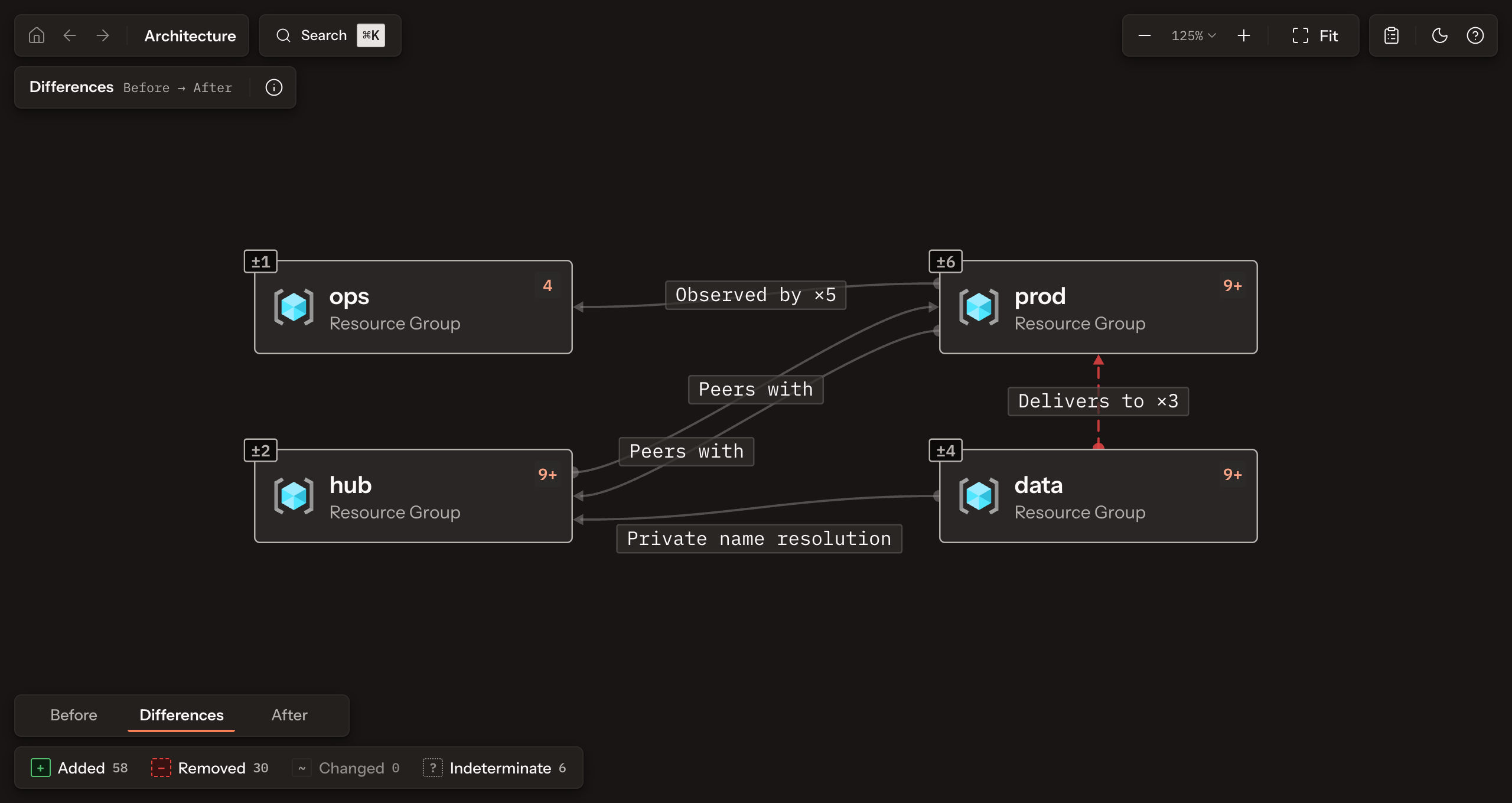
comparison.htmllocally. The selector reads Differences, Before to After, and the reading block at the bottom left switches between Before, Differences, and After. Each resource group carries the count of its changed entries, a removed relation is drawn dashed, and the Added, Removed, Changed, and Indeterminate filters narrow the canvas to one kind of change. The HTML makes no network requests. A localrootform run comparison.json --no-browser --port 0instead serves the same result on loopback; stop that server withCtrl+Cwhen finished. See Explore a Form for navigation.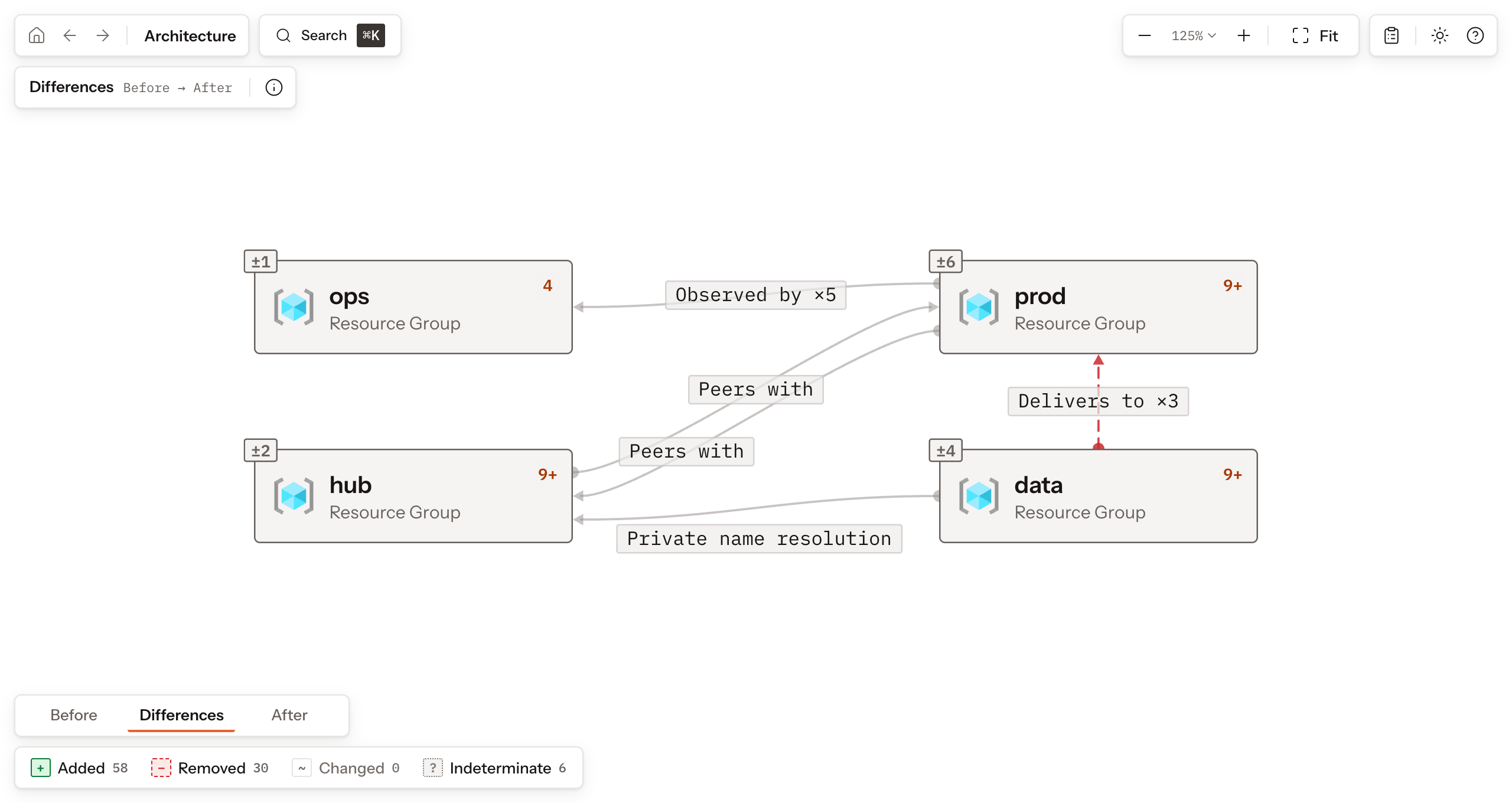
-
The text summary lists every change under its exact totals, and on an interactive terminal it opens in a pager (Outputs).
comparison.mdis written for review instead: each list shows at most ten entries spread across added and removed, states how many it shows, and is folded when longer. Add--detailsto the command to list every entry there (Review with Markdown).comparison.jsonkeeps the exact entries. It is itself a Form withkind: "comparison". Its top-levelbeforeandafterembed complete state or plan Forms underform, each with its selectedstageandselected_from.comparison.nameiscross. Reviewcomparableandproblemsbefore treating entries as comparable, then inspect Representation and fact changes alongsideindeterminate. -
A plan Form defaults to Planned, while a state Form has only a Recorded stage. For plans with a Recorded stage,
--before-stage recorded --after-stage recordedcompares Recorded architectures of separate inputs. Userefreshedfor the state the plan starts from; the plan does not record whether or how far refresh ran. Rootform refuses a requested stage that the input does not contain; it does not treat it as empty.To compare your own state JSON with a later saved plan, export each with the same Terraform or OpenTofu binary. OpenTofu users replace
terraformwithtofuin these commands:Shellterraform show -json > state.jsonterraform show -json later.tfplan > later-plan.jsonThe first file is state JSON; the second describes the later plan. Keep both private. Compare the state with the later proposed outcome:
Shellrootform run state.json --diff later-plan.json \--diff-plan-file later.tfplan --no-serve -o state-to-plan.jsonThis selects
recordedbefore andplannedafter. The saved plan adds verified traversal evidence only to the second input. Cross-input Differences do not establish drift. To review drift reported in one plan, inspect itsrecordedtorefreshedcomparison and separate drift report, as in Compare both sides of one plan. Comparisons explains these boundaries. -
Status
0proves the comparison ran, not that its report is empty;runhas no status that reports changes. Readcomparison.mdfor review and keepcomparison.jsonfor the exact entries.runnever evaluates Policies. To block a review on an architectural condition, check the saved comparison:rootform check comparison.jsonevaluates selected Policies on both Before and After by default. Use--side beforeor--side afterto gate one side; a violation on either evaluated side exits1. Outputs and exit status defines export formats and failures.
Continue with Review a pull request to plan both revisions in isolated worktrees, compare them, gate the head with the same Policies, and keep the review evidence. Check a Form with Policies selects a Pack and reads the verdict; Understand Policy outcomes explains what each verdict proves.